Quick Fix – Exchange Server Version?
May 20, 2011 Leave a comment
Just noticed a new KB pop up on the RSS Feed – here
(How to determine the version number, the build number, and the service pack level of Exchange Server)
Bit of a mouthfull!
Anyway, the powershell command they suggest is pretty basic and does not give us a real friendly out put..
Get-ExchangeServer

I much prefer this command that i snagged from this guys blog…
Get-ExchangeServer | fl name,edition,admindisplayversion
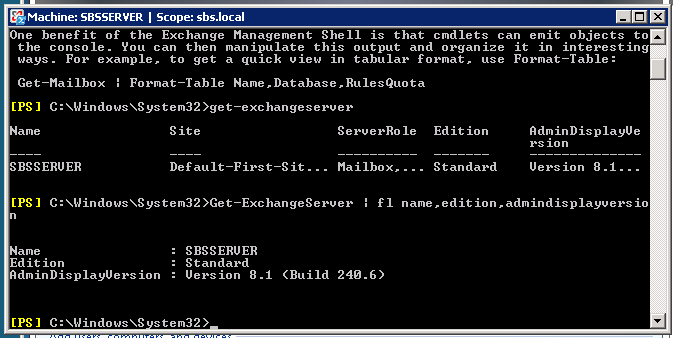
Much cleaner results – and you can actually see the important info!
Update 25/10/2011
Try this command instead:
get-exchangeserver | select-object Name, ExchangeVersion, Admindisplayversion, serverrole, edition | fl
You can then match the ‘Exchange Version’ using this wiki post and find out how up to date you are.
 About Robert Pearman


 Title (Required)