Quick Fix : Clean-up Duplicate Remote Web Access Certificates
July 4, 2018 16 Comments
 I noticed this thread in the forum a while ago, and setup a Lab network to reproduce it. Sure enough after a few days, my local machine certificate store is full of duplicated certificates.
The issue only seems to affect Essentials 2016 and only if you are using the free remotewebaccess.com certificates.
The issue is also discussed here on the MCB Systems blog.
Unfortunately for me work took over and i was not able to spend any more time on it, and with responses from Microsoft for any Essentials related issue being, shall we say, pedestrian, i wont be holding out any hope of a fix soon.
That doesn’t mean I can’t use it as an excuse to do some PowerShell though, which is about the only thing keeping my attention in the IT world these days.
So, run this in PowerShell in an elevated window, use the parameter ‘AutoClean’ as ‘Yes’ to automatically remove all the duplicates, and use the parameter ‘AddTask’ to have it setup a scheduled task to do this every day for you at 4am.
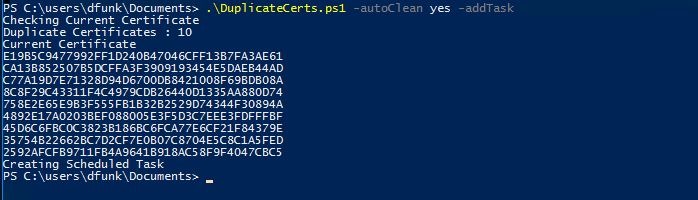
On my LAB system, the duplicate certificates was the only issue, the new certificate had been installed correctly to IIS, and to RRAS for VPN Connections.
 About Robert Pearman


 Title (Required)
Thanks Robert, that the next step I was working on with my new 2016 Essentials Server setting up the RWA. I’ll be sure to implement this.
Is it possible to do an in-place upgrade from WSE12R2 to WSE16? I’m still running WSE12R2 have everything configured and working, including DirectAccess.
I wouldn’t bother, you don’t gain much from upgrading to 2016.
Hi
This problem also affect Essentials 2012R2.
Is there a way to make the script work on 2012R2?
I haven’t tested it.
Is there any chance of this being edited to work with Essentials 2012 R2?
Is it affecting many 2012 R2 systems?
All of the 2012 R2 systems that i manage. I can’t see microsoft doing anything to fix the issue either which is very frustrating. Have to log in twice a day and check for duplicates and remove and rebind.
hello Robert, i dind’t get it completly, is your powershell a workaround or fixing the issue or just prevent?
Workaround.
Hi Robert,
I still cannot believe this issue has not been resolved by Microsoft yet!
I remember discussing this with you in July 2017!
Just a bit of further info/
1. It does seem to affect both 2012 and 2016 in both Essentials and Standard formats
2. For those hoping to use traditional DNS editing and Certify the Web as an alternate solution… It still happens albeit on a less regular basis (bi-weekly or monthly).
I’m assuming that your powershell script should be considered best practice these days on all IIS/SSTP servers ?
I wouldn’t say best practice but it will clean up your duplicate certificates for you.
Mh we tried that, but its not fixing the issue and we have to repair it again over and over.
What’s the OS? What happens exactly?
As with all code posted to the Galley, this has disappeared completely. Highlights the usefulness of actually posting code on the page. Any way you could post this in a 2022-accessible location?
If I can find it somewhere I will.