Add UK Bank Holidays to Teams Voice
May 21, 2024 Leave a comment
If you have ever administered a Phone System you will know that one of the most boring tasks you can be asked to do, is program in the new years bank holiday dates. Even today one of the most popular phone systems on the market 3CX it remains a manual task.
With Microsoft Teams Voice you of course benefit from a PowerShell interface to configure your system, and if we combine this with a surprisingly useful part of the gov.uk website we can can programmatically get, and input our bank holiday dates for the year ahead. In fact the current document has dates through to the end of 2026.
To do this we will make use of New-CsOnlineDateTimeRange, New-CsOnlineSchedule and Set-CsOnlineSchedule which are part of the Microsoft Teams PowerShell module.
I have provided a link at the end of the post where you can download the script, but I know people like to see an explanation of how these things are put together and that follows below.
The page that makes this possible is here, https://www.gov.uk/bank-holidays.json
So, in our script our first task is going to be to grab that JSON content and store it.
$dates = (Invoke-Restmethod https://www.gov.uk/bank-holidays.json -ContentType "application/json")
This will grab all the dates from the page and store them in the $dates variable.
We will then initialise some other variables.
$currentDate = [datetime]::Now.date
$engWalDates = $dates.'england-and-wales'.events
$scotDates = $dates.'scotland'.events
$niDates = $dates.'northern-ireland'.events
$dateObjs = New-Object System.Collections.ArrayList
These store the current date, which we will use to work out which events are coming up and which have passed, and the separate countries of the UK then lastly an array list to store our converted date ranges before adding to Teams.
In the next section I have added an array to filter which countries events to include, reason for this is whilst Scotland may celebrate a Bank Holiday, you may not actually close your offices and this allows a bit of flexibility on that.
$useDates = @(
    $engWalDates
    #$scotDates # commented out for Scotland
    #$niDates # commented out for Northern Ireland
)
In the example code above I am choosing to only process dates for England and Wales.
Next we have a foreach loop, which will process each date in $engWalDates and convert it to a PowerShell custom object, which includes the Bank Holiday name, the start and end date (Start Date + 1 day) and the year as a separate property.
foreach ($date in $useDates){
    $start = Get-Date $date.date
    $year = $start.Year
    if(($start) -ge $currentDate){
        $dateObj = [pscustomObject]@{
            Name = $date.title
            Start = $start
            End = $start.adddays(1)
            Year = $year
        }
        $dateCheck = $dateObjs | Where-Object { ($_.Name -eq $dateObj.name) -and ($_.Start -eq $dateobj.start) } # look for duplicate dates
        if(!($dateCheck)){
            $dateObjs.add($dateObj) | Out-Null
        }
        else{
            Write-Output "Duplicate Date : $($dateObj.name)"
        }
    }
}
We then search our $dateObjs array list for an existing value of $dateObj, if no existing value is found we add $dateObj to $dateObjs.
The next task is to group each of our $dateObjs into years.
$years = $dateObjs | Group-Object Year

We use $years in conjunction with New-CsOnlineSchedule to create a new Schedule for each year. We automatically add the Christmas shutdown to the schedule which defaults to the 25th and 26th of December.
We add the Christmas shutdown as a default, as creating a schedule requires at least one date to be added, and this seems like a sensible one to chose.
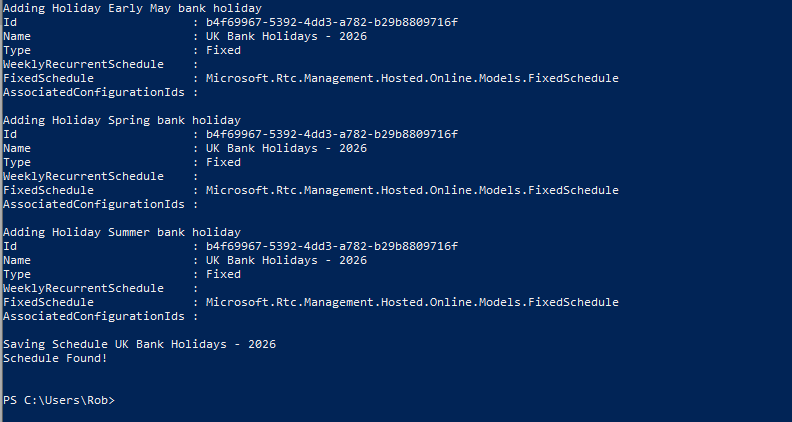
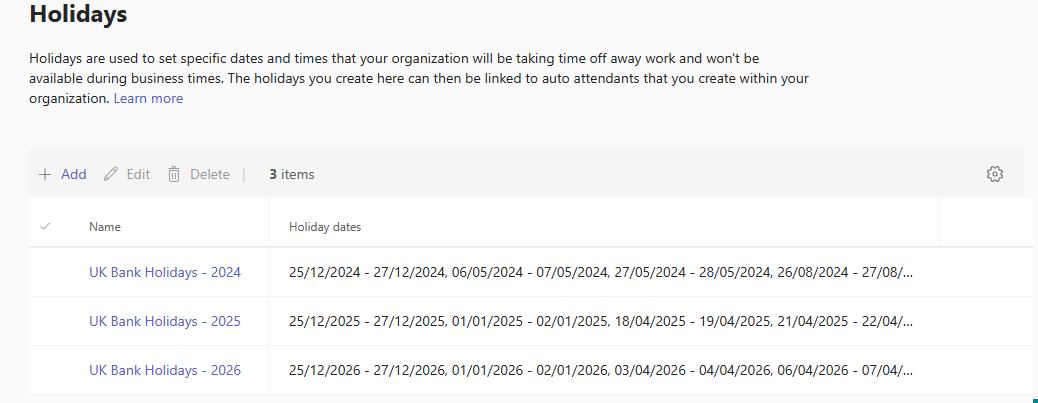
As you can see from the above example, we will create three new schedules. These will be named:
- UK Bank Holidays – 2024
- UK Bank Holidays – 2025
- UK Bank Holidays – 2026
The script will loop through and again look for duplicates, or look for the names of holidays you have specifically chosen to exclude (for example you might choose to include Scotland, but still want to exclude St Andrews Day.
$skipDays = @(
    "Christmas Day"
    "Boxing Day"
    "St Andrew’s Day"
    "St Patrick’s Day"
)
A $hol object is created with New-CsOnlineDateTimeRange using the start and end date we calculated earlier. We then add the $hol object to our schedule using the Set-CsOnlineSchedule command.
$hol = New-CsOnlineDateTimeRange -Start $holiday.start.date.ToString().split(" ")[0] -End $holiday.end.date.toString().split(" ")[0]
# check for duplicate dates
$schedule.FixedSchedule.DateTimeRanges += $hol
Set-CsOnlineSchedule -Instance $schedule
If we add all this together what do we get?

<truncated the image>
In the Teams Admin Centre we can now see our Bank Holiday schedules available and ready for use in call flows.
Now, I know what you’re thinking why just the UK?
To which I say, why not?
I did do some research while initially writing this script and found inconsistent results for other countries public holidays being shared via API until I found this website, https://openholidaysapi.org
Using this site, and some parameters we can extend our script to include most countries in Europe.
For example, France for years 2024-2026..
$countryCode = "FR"
$startYear = 2024
$endYear = 2026
$dateObjs = New-Object System.Collections.ArrayList
$dates = Invoke-RestMethod -uri "https://openholidaysapi.org/PublicHolidays?countryIsoCode=$countryCode&languageIsoCode=GB&validFrom=$startYear-01-01&validTo=$endYear-12-31" -ContentType "application/json"
if($dates){
    foreach ($date in $dates){
        $dateObj = [pscustomObject]@{
            Name = $date.name.text
            Start = Get-Date $date.startdate
            End = (get-date $date.endDate).AddDays(1)
            Year = (Get-Date $date.startdate).year
        }
        $dateObjs.add($dateObj) | Out-Null
    }
    $years = $dateObjs | Group-Object Year
}
$years[1].group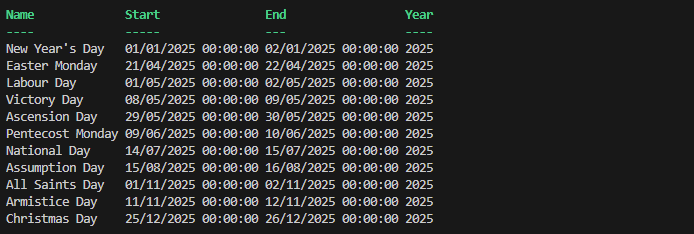

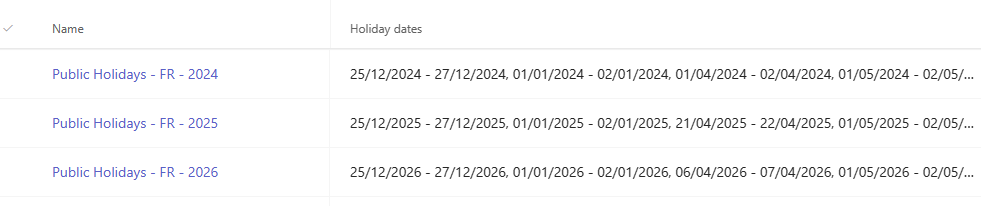
Unfortunately, the OpenHolidaysAPI site does not include the UK so you will need to query both URLs if you need holidays for mainland europe.
You can download both scripts from my GitHub page.
Thanks to Adam Bamping for his assistance with Teams Voice!
 About Robert Pearman


 Title (Required)