Quick Fix: Lenovo ThinkPad Edge E530c Function Keys not working
April 30, 2013 2 Comments
 I got my wife’s new laptop today and set about reinstalling it under Windows 7 as she ‘doesn’t understand Windows 8’, and i sympathise.
Having reinstalled with Windows 7 and downloaded all the drivers, i was going through testing all of the devices and noticed that the function keys (fn) on the keyboard were not working. This being exactly the sort of thing that my wife was bound to notice i set about trying to fix it. Having made sure i had installed the keyboard software “Hotkey Features Integration” i expected after a reboot the Fn keys would work. Sadly not.
Google turned up nothing, and i was forced to use my own troubleshooting skills.
Going into Control Panel, Keyboard i found this useful tab.
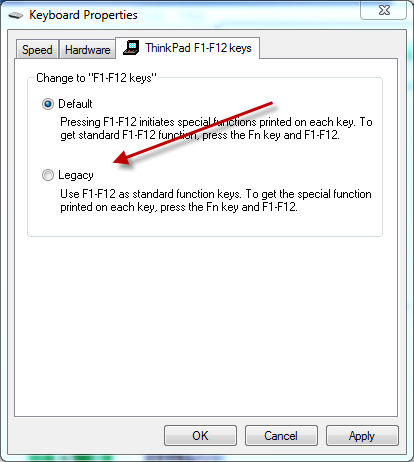
Switching to legacy mode, enabled the Fn keys to function.
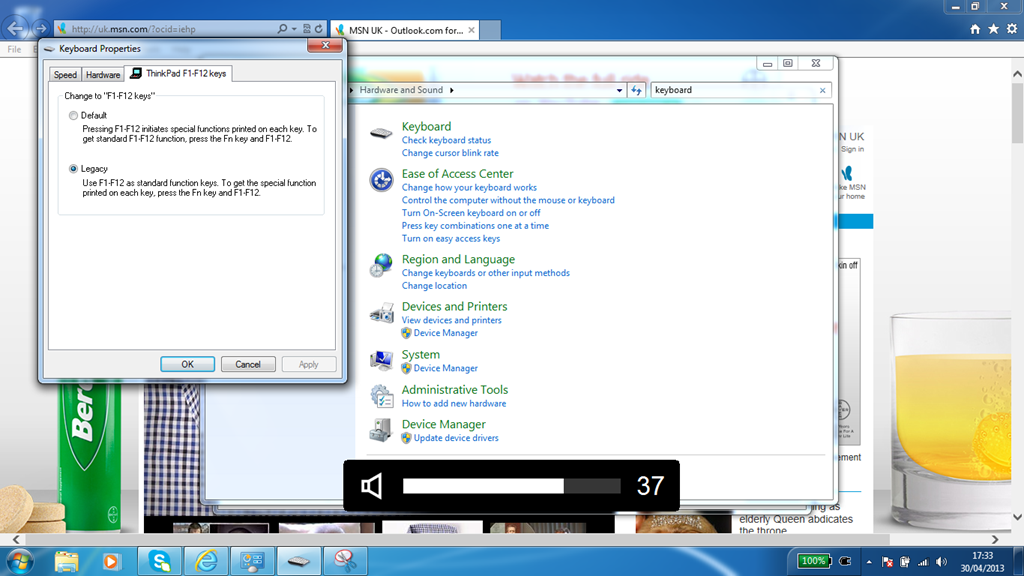
So, it would appear i am a Legacy function key presser, used to searching for the Fn key rather than simply pressing an F key and expecting to get the special function. I’m not even sure this is particularly blog post worthy, but there you go.
 About Robert Pearman


 Title (Required)
how will i set functionkey in lenovo e530c ?
Lenovo BIOS / Firmware also provides for reverse of F / Fn keys use. This may be unique to the ThinkPad Edge line as I don’t recall seeing it on other ThinkPads BIOS.