Windows Server Essentials – Configuration Troubleshooter

powershell2xa4I had a support case this week where it became apparent to me that there is no quick and easy way to test Essentials Servers for Configuration errors. Manually working through IIS or Certificates is prone to human error, as was proved to me, by me missing certain key things.

Uncharacteristically i decided to write a PowerShell script to save me from this sort of embarrassment in the future, and make me look really good next time i need to troubleshoot an Essentials Server.

You can download the tool from here, and am very interested to hear how it works for you.

If you have already downloaded it, i have updated the tool so you should download it again!
Read more of this post

Essentials 2012 R2 – Client Restore

Logo1Congratulations on the purchase of your brand new Windows Server 2012 R2 Essentials Server. I’m sure she will give you years of trouble free.. er.. serving.

No doubt one of the features that attracted you to Essentials R2 over its predecessor was the unique way it can be licensed in Hyper-V. No?

Regardless of that, you may well be familiar with the Client PC Backup Service that comes as part of this OS. You may also know that you create a USB key to boot the client PC from in order to launch Bare Metal Restore. Something i documented with real aplomb on YouTube. 

However, if you have decided to virtualise your Essentials server – how are you going to get that USB disk plugged in? Assuming you do already have a USB key what if your NIC is not supported?

Read more of this post

Quick Fix: SBS & Essentials OU Structure

Logo1Are you new to managing an OS other than Small Business Server?

If so you may be forgiven for thinking that that ‘MyBusiness’ OU Structure present in SBS for as long as i have worked with it, is the norm for an Active Directory domain. Indeed if you go into Group Policy Management and find those OUs missing, you might think… er.. ‘this is broken!’

Read more of this post

Windows Server 2012 R2–November Update Rollup

Logo1Another quick announcement – November UR for 2012 R2, Windows RT 8.1 & Windows 8.1 includes no fewer than 15 fixes for issues that will also affect Windows Server 2012 R2 Essentials.

http://support.microsoft.com/kb/2887595

The most interesting fix to those deploying Essentials R2 may be:

KB 2898803 All client backup settings are removed after you start the Windows Server Essentials Management Service in Windows Server 2012 R2 Essentials

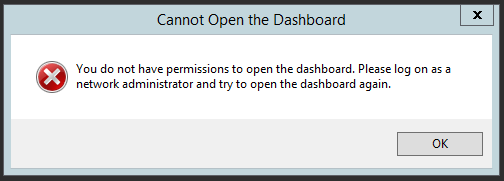
Windows Server 2012 R2 Essentials –You do not have permission to open the dashboard.

A question came up in the Essentials Forum recently which prompted me to build quite a large lab, and not even manage to repro the issue. The issue affects both the Essentials Role and the SKU., but it does not appear to affect R1.

The symptoms were, that a user of the Domain Admins was unable to open the Dashboard, being greeted instead with this error..

You do not have permission to open the dashboard

Read more of this post

Essentials 2012 R2 – The Role & Licensing

explodinghead2In conversation with some Microsoft folks recently we found out about some, what ill call, small print, in the EULA of Essentials and Essentials R2.

If you had previously purchased Server 2012 Standard, and exercised down grade rights to install a copy of Essentials, you may be surprised to learn that ‘to the letter of the law’ you would therefore be required to purchase Server CALs and more expensively RDS CALs if you intended to use the RWA feature to remote access client computers.

Read more of this post

DirectAccess, Essentials 2012 and the mystery of DNS Failures

I am writing this post in order to try and highlight the issues people are having with DA, and suggest a course of action. Rather than simply reply to comments about various bits not working.

It was October last year when i posted my process for enabling DA on Essentials 2012, and at the time i was really excited about the new OS and the possibilities that having a supported DA configuration for SMB would bring. If you are not on-board with DA and what it can bring your customers – you need to consider it. Just like PowerShell i think DA is a really important technology for people to be picking up and deploying for small businesses.

Unfortunately, it is not working as smoothly as i had hoped, and, Microsofts response so far has not been ideal and has sapped a lot of the passion i had for this product.

Read more of this post