November 3, 2011
by Robert Pearman
 I currently have a number of books on my desk that i use for reference, you may have heard of them, read them, bought them, stolen them, sorry, borrowed them etc, Anyway they wont be a new idea to you, i don’t mean books in general i mean these particular books. I am of course referring to the Administrators Pocket Consultant series from Microsoft Press.
All of them unnervingly seem to be written by the same person, Mr William R Stanek. Anyway there is a point to this.
I have been answering questions in the forum recently and i find myself asking the OP, hey do you have XYZ update installed?
They usually reply, how do i check?
Of course i refer them to their Administration journal, which clearly shows the date and time any update had passed testing and was approved for installation, the name of the tech who logged onto the server, the colour of his socks he had on whilst he installed it. Of course it could have been a her.
Knowing many of you don’t keep such a journal only saddens me, i like to know what colour socks i had on, on a given day and i frequently go back and check.
I turned of course to my PowerShell Administrators Companion, and found the following command.
Never again shall you be left red faced by the question, do you have XYZ update installed? Not only will you be able to answer with confidence, you will be able to give all sorts of other detail that will really impress me.
Loading up PowerShell, you can simply type…
Get-Hotfix

This will list all of the Updates, Hotfixes and Service Packs that have been installed onto the system, it will also list the date, and who installed them.
But how does that help you find a specific update? Simply add the KB number you are looking for.
Get-Hotfix –id <KB Number>
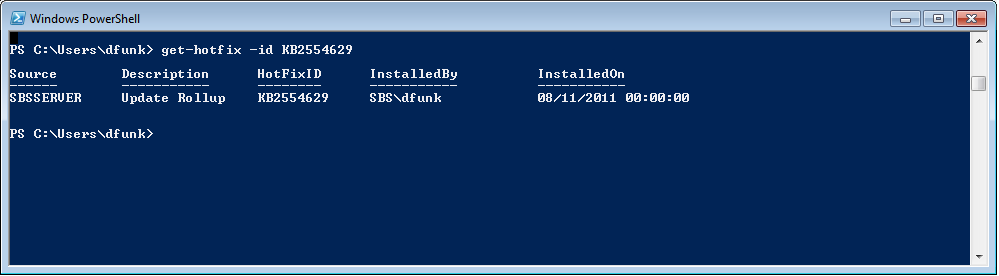
For example if i want to know if i have installed SBS Essentials Update Rollup 1, i can type..
Get-Hotfix –id KB2554629

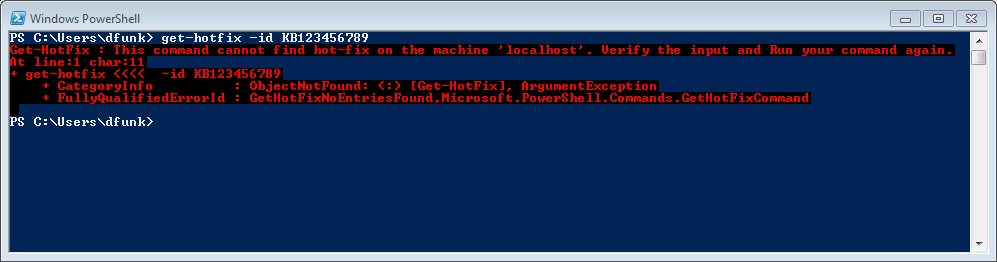
If the hotfix is not installed you will get an error.
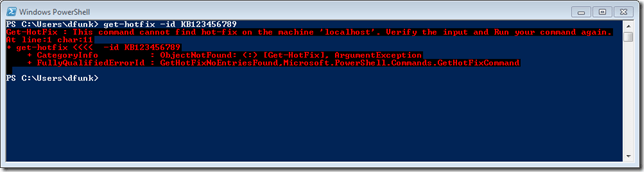
As easy as that.
By the way, I’m not selling these books nor do i earn commission out of their sale, but i have one of these books for pretty much every Microsoft Server/Client OS i support. They are cheap and are just full of brilliant tips such like the one i just ripped off and turned into a blog post.
 I have never been able to understand coding. It has always been a bit of a mystery, or black art to me, left for the likes of Slytherin house to enter their Parseltounge into Visual Studio or your developer tool of choice.




 Title (Required)