Quick Fix : SBS 2011 Standard OWA – 500 Internal Server Error?
June 13, 2011 5 Comments
I came in this morning to write some documentation for a client after a migration to SBS 2011 Standard. Focussing on the differences in the new RWA and how to use it effectively.
When i logged into the RWA and clicked on check email i was presented with this:
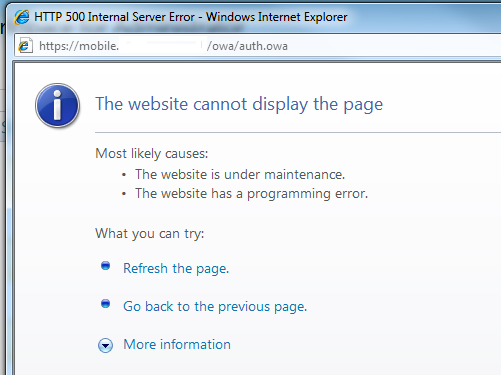
Oh, i thought, maybe i logged in with an admin account that doesn’t have a mailbox. Not a problem, so i logged back into the RWA with an account that definatley does have one.
Nope, same problem.
I logged onto the server and checked that all of the URLs for OWA were correct in the EMC, i turned to IIS – i tried to browse the OWA site directly through IIS and received the same problem.
Loading up the services.msc console i sorted all services by their startup type and noticed that one service for exchange was not running.
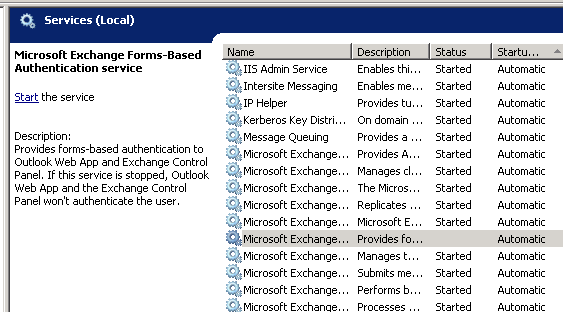
Starting this service and reattempting the login to OWA resolved the problem.
 About Robert Pearman


 Title (Required)
thank you so much, I had changed network cards and reconfigured the new card with the IP and restarted the server when it came back up I had the exact problem you described was about to rebuild the OWA virtual directories but just started the service and voila :)
thanks
Glad it was useful!
Thanks for posting with an appropriate title. This was my issue when I performed a routine restart of the server. That service (even though it is set to automatically start) did not start after the server reboot. Starting the service resolved the issue. Quick fix indeed!
you are the man…
Thanks for this, solved a very worrying issue. Just a quick question, did this issue go away or did it still occur after every reboot of the new server?